menu

No Beard Filter - Remove Beard with AI

Our AI no beard filter helps users quickly visualize a clean-shaven look without the need to shave or retake photos. It's ideal for professionals, social media users, and anyone curious about their appearance without a beard.

Try the Clean-Shave Look Without Shaving

natural beard-free makeover

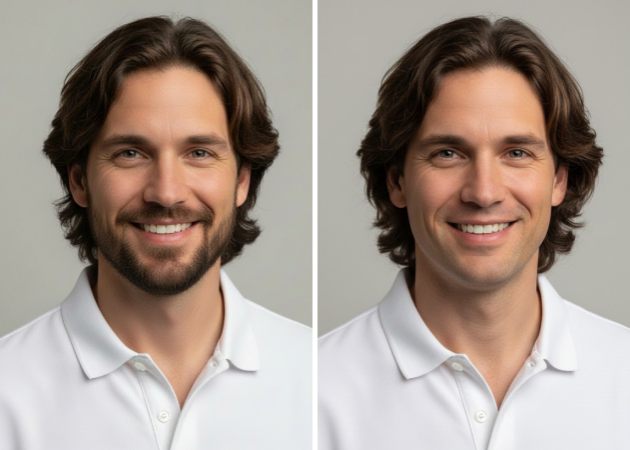
Natural Beard-Free Makeover

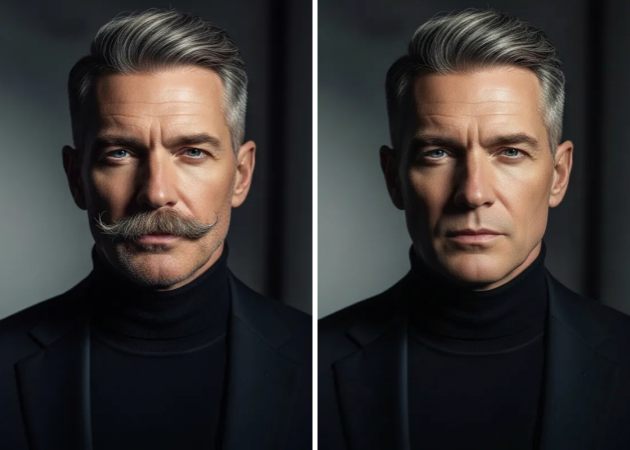
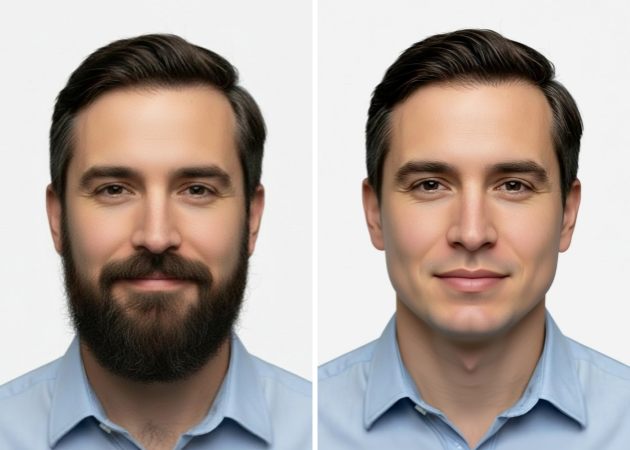
This AI no beard filter steps further by adjusting related facial details so everything stays balanced. While it clears the beard and mustache, it gently adjusts areas like the jawline so everything looks natural. Since it works in one smooth step, the photo doesn’t feel heavily edited. Besides, your face simply looks cleaner and more defined, not changed. That’s why it feels like a helpful improvement rather than a basic edit.

Perfect Your Look for Formal Photos

Using the remove beard filter, you can quickly prepare photos that feel right for resumes, LinkedIn profiles, business cards, or even weddings. This tool helps you look prepared and confident rather than retaking photos or worrying about grooming. It carefully detects facial hair and removes it without blurring or distorting your features. This ensures that your final image feels trustworthy and professional. It's a simple way to put your best face forward without manual editing.

perfect your look for formal photos
showcase your no beard transformation

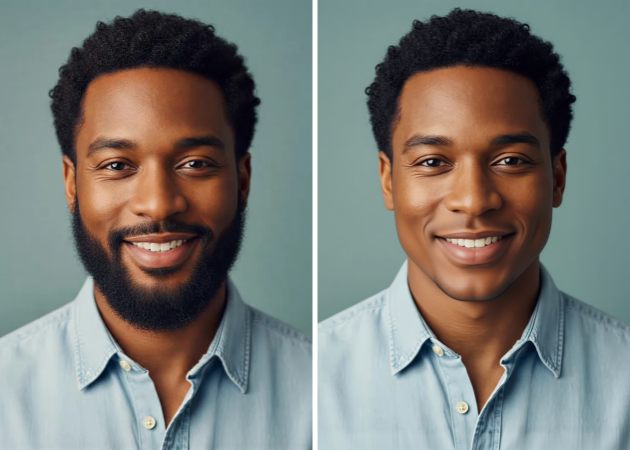
Showcase Your No-Beard Transformation

This no beard filter photo editor is also perfect for playful moments online. When you remove a beard from photo online, you can create fun before-and-after shots that instantly grab attention. Then, posting these on Instagram, TikTok,Facebook, or Snapchat often sparks reactions, laughs, and conversations. It’s a great way to surprise friends or show off a totally different side of yourself. At the same time, the edit still looks clean and believable, not cartoonish.

Customize Your Perfect Look

By using multiple AI models like Nano Banana and Qwen Image Edit, our online no beard filter adapts to different face types and styles for cleaner results. You can describe how you want to look, whether that means fully clean-shaven or just a slightly shorter beard. This makes the change feel personal, not automatic or generic. It also lets you edit the transformation description to perfectly match your vision. It’s like guiding the edit yourself, but without needing any editing skills.

customize your perfect look

Remove Beard Online with Ease

  • 01
    Access the AI Photo Editor
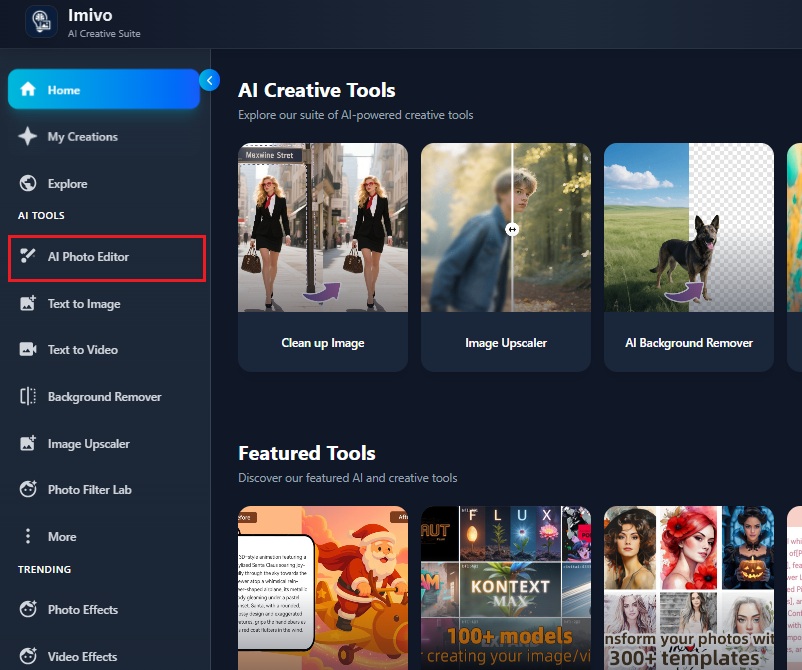
    To get started, open the AI photo editing platform on your computer or mobile device. Make sure you log in or create a new account if you don’t have one yet. After that, look for and click on the "AI Photo Editor" option to begin editing your photos.
  • 02
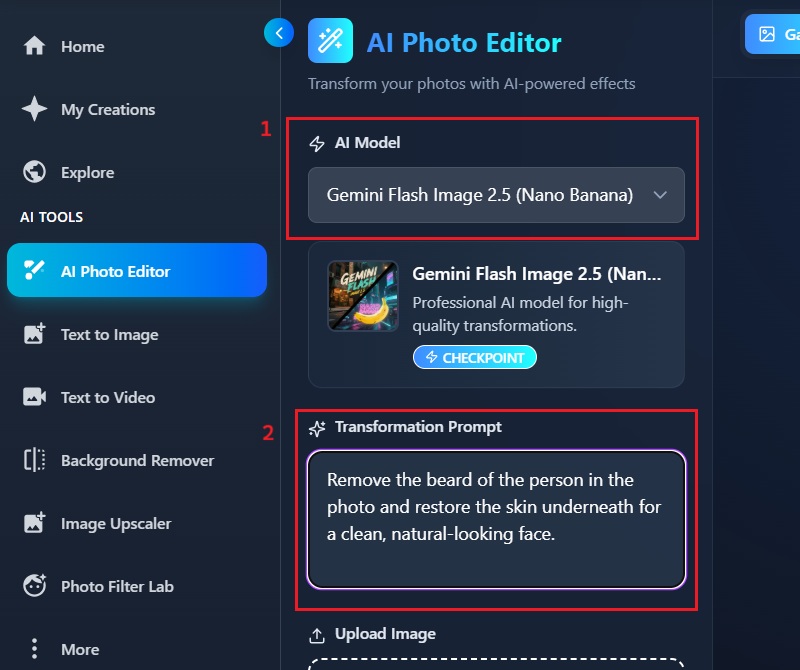
    Type Description Prompt
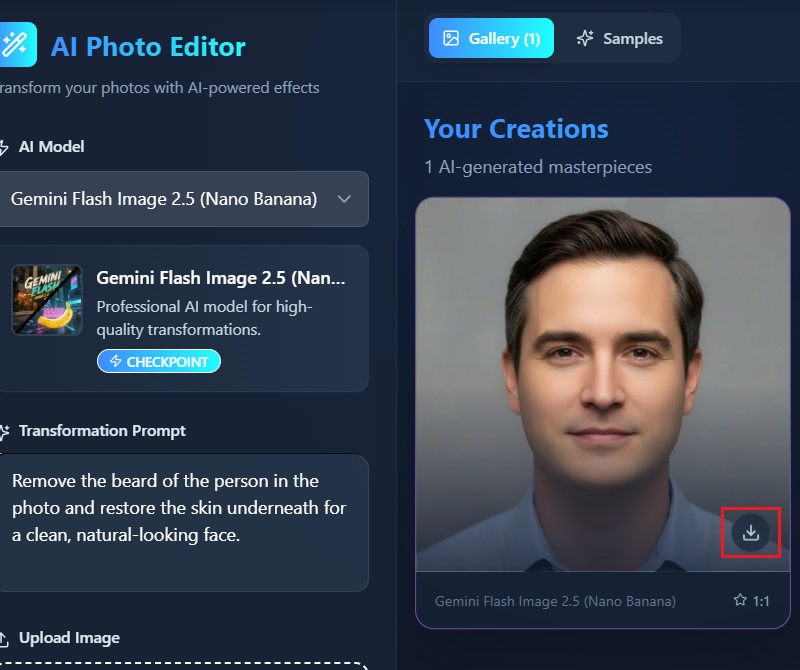
    After opening the AI Photo Editor, select the AI model you want to use for your photo. Then, type a clear description of the changes you want in the prompt box. This helps the tool understand exactly how to edit your image.
  • 03
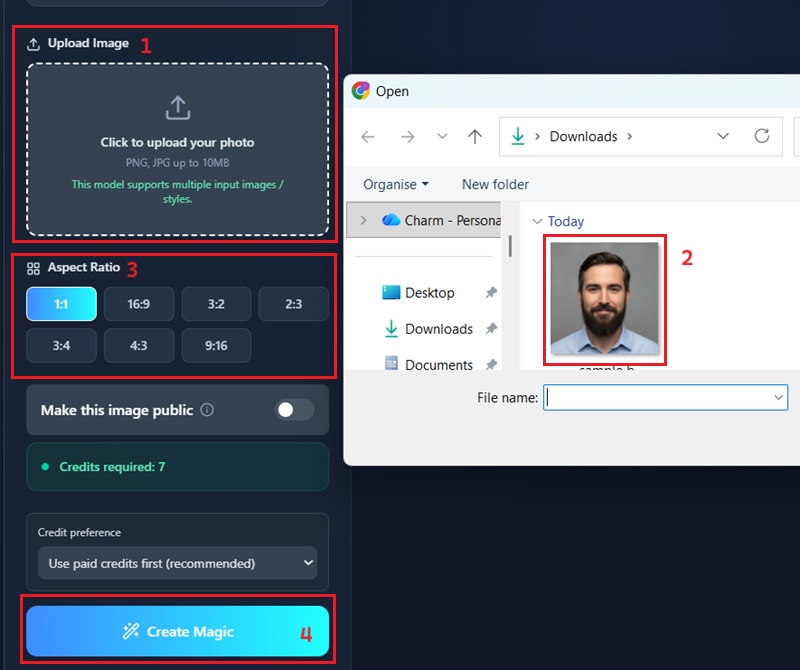
    Remove Beard
    After entering your description, pick the aspect ratio that fits your image. Make sure everything looks correct before proceeding. Then, click “Apply Effect” to let the AI process and remove the beard from your photo.
  • 04
    Review and Save Your Photo
    Once the AI finishes processing, check the image to make sure it looks the way you want. If needed, you can make small adjustments or try the process again for a better result. When you’re satisfied, download or save the clean-shaven photo to your device.
access the ai photo editor
type description prompt
remover beard
review and save your photo

More Effects and Filters to Make Your Photos Fun

If you enjoy creative photo and video edits, you might also like apps for adding fun filters, turning photos into cartoons, or making short videos with effects. These tools are perfect for anyone who wants to express themselves, share engaging content, or experiment with new looks.
"I used the AI no beard filter to see how I’d look clean-shaven for a work profile photo. The result looked natural and didn’t mess up my skin tone. It saved me from retaking photos."
Stefan Myers, Office Administrator
2026-01-04
iiiii
iiiii

"I used it for fun to see how I’d look without facial hair. The change was noticeable but still realistic. My friends couldn’t tell it was edited right away. That made it more enjoyable to use."
Lorcan Browning, College Student
2026-01-02
iiiii
iiiii

"I was curious whether an online tool could really remove a beard without making it look fake. Surprisingly, it did a clean job and kept my facial details intact. I used it for a client profile image. It worked better than I expected."
Joseph Pineda, Freelance Graphic Designer
2025-12-29
iiiii
iiiii

"I needed a clean-looking photo for LinkedIn and didn’t want to shave yet. This tool helped me preview a no-beard look easily. The photo still looked like me."
Donald Sandoval, Sales Associate
2025-12-24
iiiii
iiiii

"I tried the AI no beard filter just out of curiosity. The beard removal looked smooth and natural, especially around the jawline. It didn’t blur my face as some apps do. Overall, it was easy to use."
Hassan Clark, IT Support Specialist
2025-12-14
iiiii
iiiii

"I wanted a more professional-looking headshot without scheduling another shoot. This online beard remover helped clean up my look in seconds. The result didn’t feel over-edited. I’d use it again for formal photos."
Uzair Chase, Marketing Coordinator
202512-01

iiiii
iiiii

Why Choose Us

FAQs About AI Beard Removal

Can it remove the beard naturally?

Yes, the AI no beard filter can remove the beard naturally. When you use it, the tool analyzes your face and erases the facial hair without affecting other features. The skin texture stays smooth and consistent, so it doesn’t look edited. Even areas near the jawline or chin are adjusted carefully to match the surrounding skin. You don’t need to manually fix anything afterward. The process is quick and works in just a few seconds. Overall, the final photo looks like a real clean-shaven version of yourself.

Who can benefit from a no beard filter?

Anyone who wants to see how they look without facial hair can benefit from this tool. Professionals can use it for LinkedIn photos, business cards, or CV images. On the other hand, social media users can create fun before-and-after posts for friends and followers. You can also test a clean-shaven look before deciding to shave in real life. Moreover, photographers or content creators can use it to quickly prepare headshots without having to reshoot. Basically, it’s useful for anyone who wants a natural, beard-free preview of themselves.

Can it remove the beard without removing the mustache?

Yes, the tool can remove only the beard, leaving the mustache intact. You just need to specify your preference in the transformation prompt before processing. The AI will focus on the beard area, leaving the mustache intact. This lets you experiment with different styles without affecting the parts you want to keep. The customization is easy to do and takes just a few clicks. Once applied, the result looks natural and seamless. You can repeat the process if you want to adjust any details further.
Is the beard removal effect realistic for every facial structure?

The effect works well for most face shapes and structures. The AI adjusts not just the beard but also the surrounding areas to maintain balance. This means your jawline, chin, and cheeks still look natural. The tool is designed to preserve your facial features while removing hair. You don’t need advanced editing skills to get a realistic look. This creates a believable, clean-shaven appearance for nearly all face types.

Will the image have watermarks after removing the beard?)

No, the images do not have watermarks after processing. You can download and use them freely for social media, professional photos, or personal use. The tool ensures that the final result is clean and ready to share. Furthermore, the quality remains high, so the photo still looks professional. This makes it convenient for any purpose where you want a polished image. You can focus on sharing or saving your beard-free photos without worrying about marks.
pro image logoAceThinker PicWish

Transform Your Images Instantly with a Professional Image Editor

pro banner image
Back to Top
Contact Us
Learning Center