








PC Gameplay Recorder for Smooth Game Capture Experience
Capture your PC gameplay with smooth, high-quality performance and no lag, so you can record, save, and share your best gaming moments easily with friends or on online platforms.
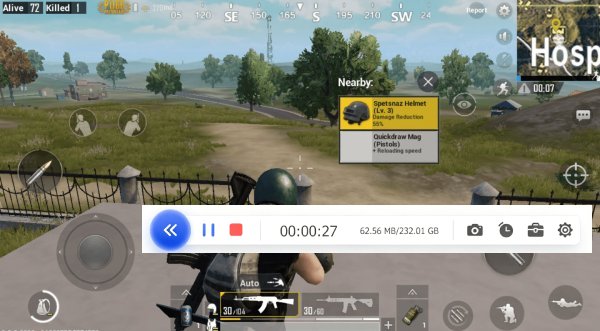


Popular Ways to Use This PC Gameplay Recorder
Highlights the real use of features while playing, streaming, or sharing games.
How to Record PC Gameplay Without Lag
Start recording your games in a few steps and save highlights or full sessions easily.
-
1
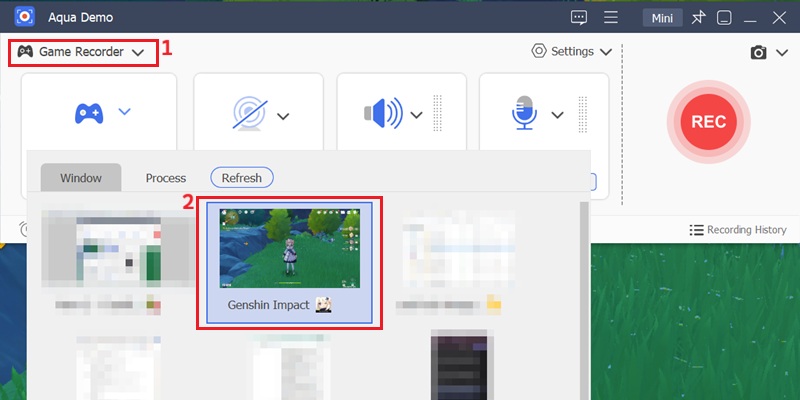
Configure Game Capture Mode
Select Game Recorder from the video capture dropdown and define the specific game window you want to record. This ensures the system isolates gameplay rendering instead of full desktop activity for cleaner performance capture.
-
2
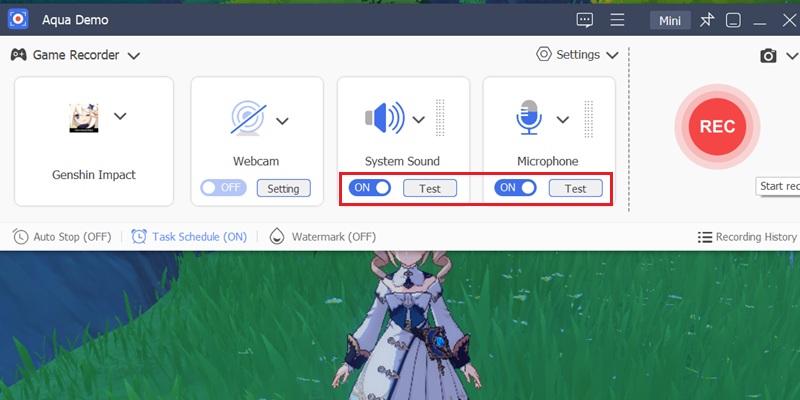
Assign System Audio and Voice Input Channels
Enable system sound to capture in-game effects and optionally activate microphone input for live commentary. This dual-channel setup keeps gameplay audio and user narration synchronized in one recording stream.
-
3
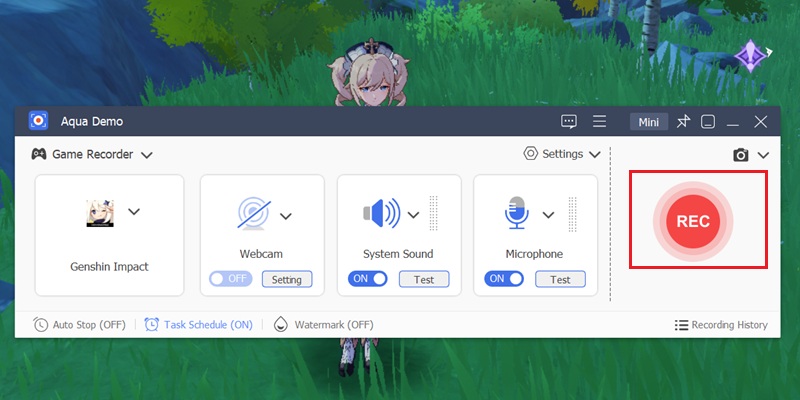
Initiate Real-Time Gameplay Recording Session
Press the record control to begin capturing gameplay instantly with low-latency screen encoding. This preserves frame consistency and reduces lag during fast-moving in-game sequences.
-
4
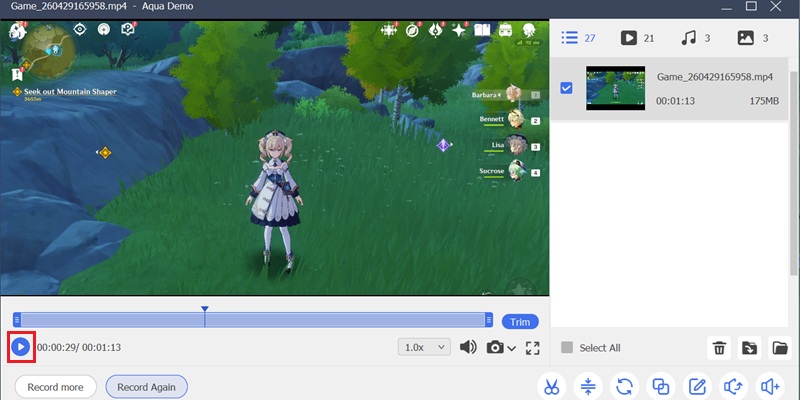
Review Recorded Gameplay in Preview Mode
Stop the recording after gameplay ends and open the preview window to evaluate video smoothness and audio clarity. This allows quick validation before saving or reusing the footage for uploads or edits.
Why People Use This PC Gameplay Recorder
Let players create gaming videos, walkthroughs, and highlight reels for audiences.
Capture Fast Gameplay Without Performance Drops
Record smooth gameplay in HD or 4K while keeping a high FPS stable. Works well for fast action games, esports, and story-driven titles where performance matters.
Add Webcam Reactions While You Play
Record gameplay with a live face-cam overlay in one session. It lets you show reactions and personality without needing separate recordings or extra editing.
Turn Gameplay Into Shareable Highlights
Record your session first, then quickly remove unwanted parts using the built-in Advanced Trimmer. Keep only the best moments and export them in minutes.
Capture Game and Microphone Audio Together
Record in-game sound and your voice simultaneously with no extra setup. Everything stays synced, so your reactions and gameplay audio feel natural.
4K 60 FPS Gameplay Recording with GPU-Level Encoding Stability
Record High-Speed Gameplay with Frame-Perfect Precision
AceThinker utilizes a GPU-Accelerated Recording Engine to preserve fast-motion gameplay, particle effects, and HUD elements in full 4K UHD quality. Our frame analysis confirms that rapid camera movement and action sequences maintain smooth 60 FPS playback without screen tearing or visual compression. This ensures competitive gameplay recordings retain professional streaming quality.
Technical Metrics
We measure gameplay recording performance using frame-stability benchmarks and real-time capture metadata. Every session is optimized for low-latency gameplay recording with synchronized audiovisual playback.
Comparison Chart
| Feature | Online Gameplay Recorder | Pro Gameplay Recorder | OBS Studio |
|---|---|---|---|
| Recording Capabilities | Basic screen recording only | Advanced tools: voice, webcam, scheduled recording, editing | Screen capture with customizable sources and audio options |
| Setup | No installation needed, works in browser | Quick install with full control and settings | Requires installation and configuration |
| FPS Impact | May cause lag on high-performance games | Optimized to record PC gameplay no lag | Performance depends on system and settings optimization |
| Recording Quality | Limited resolution and frame rate | High-quality HD/4K recording with smooth FPS | Supports high-resolution recording (HD/4K depending on setup) |
| Best For | Quick clips, casual users | Gamers, YouTubers, and creators who need high-quality recordings | Users who want flexible recording and streaming control |
| Start Recording | Get Pro Version | Learn More |
Other Solutions You May Like
Record Your PC Games Effortlessly
Never miss an epic moment—record your gameplay instantly and smoothly in your browser, with no installation required and zero lag.
Frequently Asked Questions
Why does my PC gameplay recording lag or drop frames?expand_more
What FPS and resolution should I test before recording fast-paced gameplay?expand_more
Why does my gameplay recording have video but no game audio?expand_more
Should I record the full desktop or only the game window?expand_more
What should I do after recording before uploading gameplay to YouTube or social media?expand_more
Start Recording Your Gameplay in Seconds
Capture your best gaming moments instantly with no lag, no watermark, and no complicated setup.