








Online Music Recorder for High-Quality Recording
Use this music recorder to capture music and audio with clear sound. Record from your browser, microphone, or both with reliable quality and simple recording controls.


Start Recording Instantly
Configure your session and record with one click.
Popular Ways To Use This Music Recorder
Record clear audio with simple tools designed for music, vocals, and sound projects.
Simple Steps to Record Music
Step-by-step guide to record music from anywhere you like.
-
1
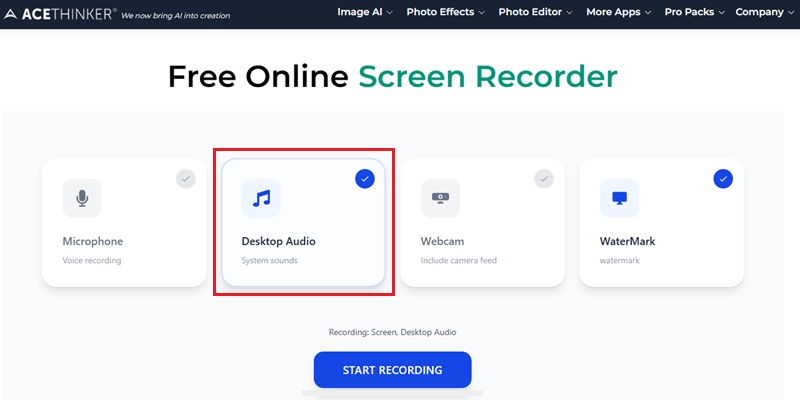
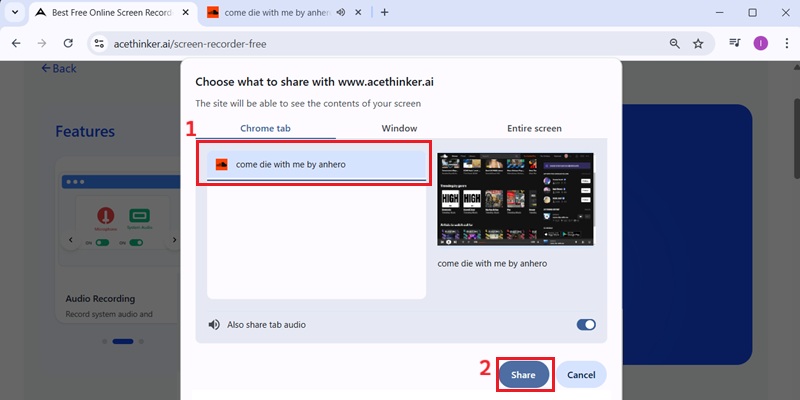
Select Your Audio Input Source
Choose your microphone, system sound, or both to prepare vocals, instruments, or other audio for recording. This keeps your input ready for clear browser-based capture.
-
2
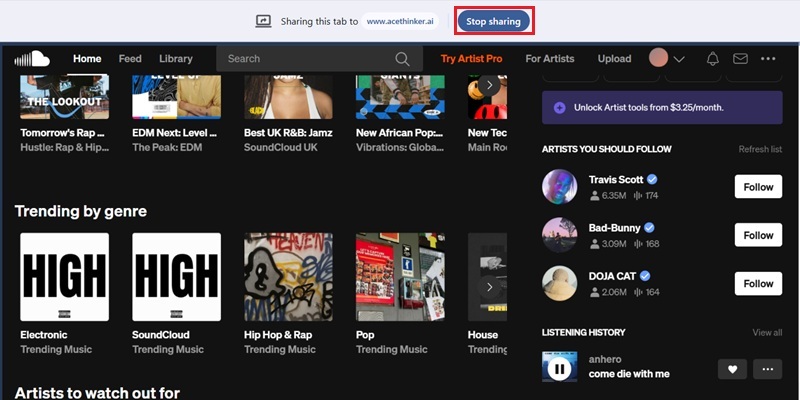
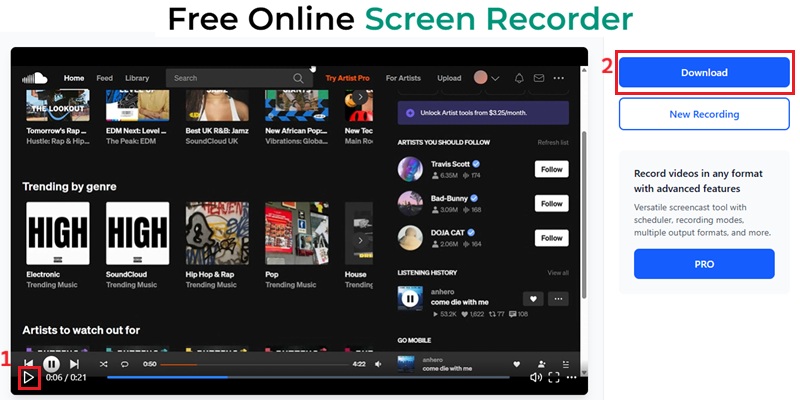
Capture Audio Instantly in the Browser
Start recording as soon as your input is ready to capture music, vocals, or live sound in real time. This keeps recording fast and uninterrupted, with no extra setup.
-
3
Save Audio for Immediate Access
Stop recording once your session is complete to save audio instantly in the browser. This keeps your recording ready for quick access and playback.
-
4
Inspect Playback for Audio Clarity
Play the recording back to inspect clarity and confirm your audio was captured without distortion or dropouts. This helps ensure smoother playback and cleaner output.
Why People Use This Online Music Recorder
Effortlessly capture music, vocals, and audio for practice, sharing, or creative projects.
Record Music with Studio-Level Audio Quality
Capture vocals, instruments, and musical ideas at up to 320 kbps, preserving clarity and detail that closely match a studio recording. Everything is processed locally in your browser, so your audio never gets uploaded to external servers.
Start Recording Instantly Without Setup or Software
You can begin recording directly in your browser with no installation required. It’s designed for musicians who want to capture ideas quickly without dealing with complex studio tools or delays.
Keep Full Control Over Your Audio From Recording to Editing
Once you finish recording, you can immediately clean up your audio using the built-in trimmer. This lets you remove silence or rough sections without switching to another editing program.
Reliable Performance for Clean, Stable Music Capture
The recorder is optimized for stable, low-latency audio capture, helping you avoid distortion or interruptions. This ensures your vocals and instruments stay consistent even during longer sessions.
Lossless Music Capture: 320kbps Bitrate & 48kHz Sampling
Studio-Grade 320kbps Music Capture
Online Music Recorder maintains the complete audio spectrum by capturing at 48kHz/320kbps, ensuring the bass, vocals, cymbal air, and acoustic harmonics remain untouched. Unlike 128kbps recorders that introduce compression artifacts and treble roll-off, the system provides clean transient attacks, accurate stereo imaging, and zero high-end collapse, making it suitable for capturing streaming music, instrumentals, and live performances.
Technical Metrics
With low-jitter clock processing and noise-shielded PCM buffers, Online Music Recorder preserves micro-dynamics, stereo balance, and transient sharpness. This precision yields studio-realistic waveform structure, critical for recording music tracks that maintain emotional and spatial authenticity.
Comparison Chart
| Feature | Online Music Recorder | Desktop Music Recorder | Soundtrap (Online Music Studio) |
|---|---|---|---|
| Setup | Works instantly in browser | Requires installation | Browser-based, no installation required |
| Start Time | Immediate | Needs setup | Accessible after login |
| Accessibility | Works on any device with a browser | Limited to installed devices | Accessible on multiple devices |
| Ease of Use | Beginner-friendly | More complex with learning curve | Suitable for beginners |
| Best For | Quick recording & ideas | Full music production | Online recording and collaborative music projects |
| Start Recording | Get Pro Version | Learn More |
Other Solutions You May Like
Begin Recording Music Instantly Online
Record music online directly in your browser with no installation required, making music capture simple and accessible anywhere.
Frequently Asked Questions
How do I record online music or streaming audio from my computer?expand_more
Why is my music recording missing system sound?expand_more
Should I record system audio only or include microphone input?expand_more
How can I avoid background noise when recording music online?expand_more
What should I check if the recorded music sounds too quiet or distorted?expand_more
Start Recording Music Instantly Online
Capture music, vocals, and audio directly in your browser with no installation required, and start recording your ideas in just a few clicks.