menu

AI Origami Filter – Turn Photos into Folded Paper Art

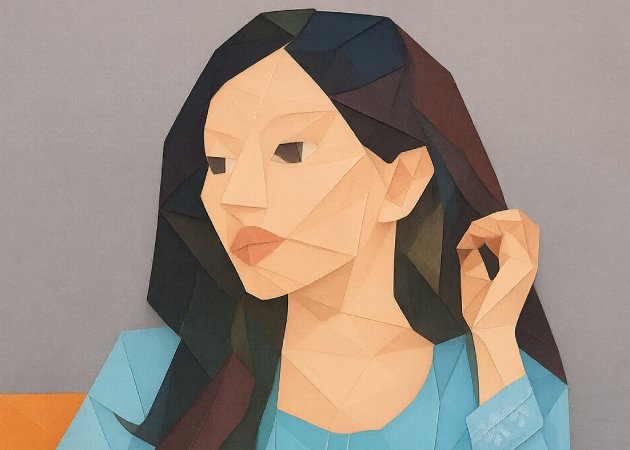
The AI Origami Filter is an intelligent image analysis tool that transforms ordinary images into origami-inspired artistic works. It recreates the appearance of folded paper with crisp lines and overlaid forms without obscuring the primary subject. With a few clicks, a user can create artistic images that appear to be hand-made, contemporary, and aesthetically pleasing.

AI Origami Filter Turn Your Photos into Realistic Paper Fold Textures

transform photos into origami style artwork

Transform Photos into Origami Style Artwork

Using the AI Origami Filter feels like watching your photo slowly unfold into a piece of folded paper art. Instead of simply adding an effect, the tool carefully reshapes lines and surfaces, making the image feel intentionally crafted rather than digitally altered. This is especially helpful for users who want their visuals to feel artistic without losing the original subject. The result keeps familiar forms intact while adding structure and creativity. For anyone who struggles to make photos stand out, this filter adds personality without overwhelming the image.

Realistic Paper Folds and Layered Depth

The best thing about this tool is that the folds and shadows look natural. The AI knows where depth is needed, therefore the paper layers do not feel like flat and hard. This makes pictures more interesting, particularly when seen on the big screen or forwarded over the internet. Light and texture will work together seamlessly, as users concerned about visual quality will pay close attention to visual quality. It makes your image look handmade and requires no handicraft or design skills.

realistic paper folds and layered depth
artistic simplification with clear details

Artistic Simplification with Clear Details

Complicated photos may be overwhelming, and the AI Origami Filter does simplification smartly. It eliminates visual noise and deploys significant shapes and details. This makes the image easier to read at a glance, particularly helpful for artistic projects or visual storytelling. The users do not need concern of distortion of faces, objects, or important elements. The contrast between abstraction and clarity makes the final result readable yet artistic.le.

Reliable Results Across Different Photo Types

The filter can adjust smoothly to various content whether you are posting a portrait, object photo or a clean background image. The folding patterns are set depending on the structure of the image, thus the results are not arbitrary. This consistency helps save time to those users who prefer to have reliable results without experimentation. It works best for people who work with diverse images and want a single artistic style. First-time users can post photos with confidence and achieve satisfactory results.

works seamlessly across different images

How to Create Origami Style Photos AI in Seconds

  • 01
    Access the AI Origami Filter
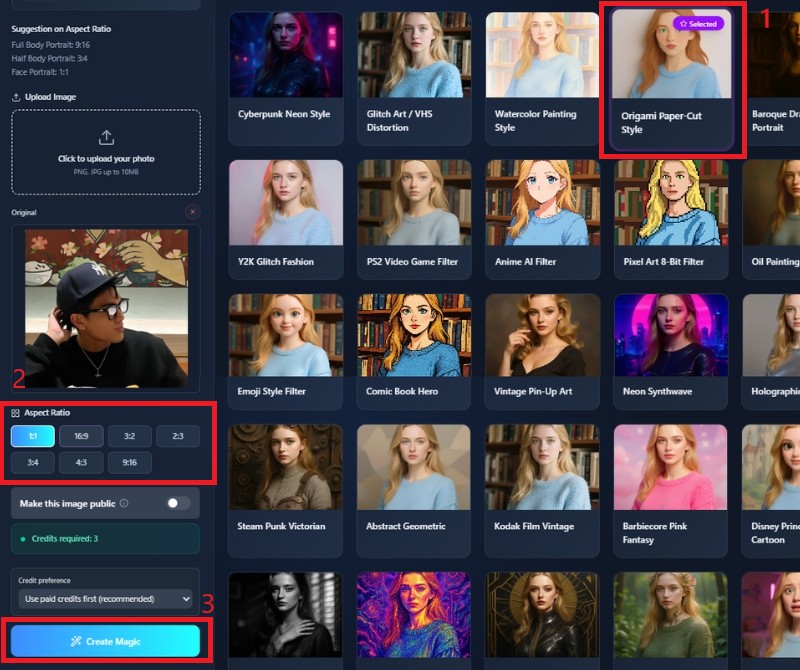
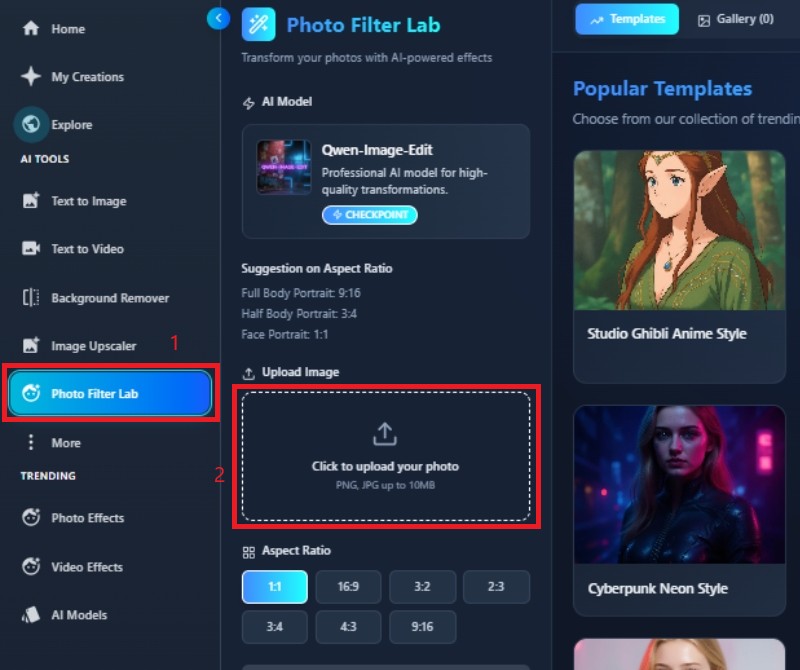
    The first thing is to open the AI Origami Filter in your web browser. To use the tool to its fullest potential, create a profile or log in. After logging in, you will be taken to a streamlined, easy-to-navigate dashboard. This arrangement lets you start making origami-style pieces without installing any software.
  • 02
    Upload Your Image
    To transform a photo, simply drag the image into the workspace or use the upload button to upload the photo you would like to transform. The tool also assists in using common image formats. To make the photo most effective, select an untouched one with identifiable subjects and a plain background. This helps the AI develop more realistic, aesthetically pleasing folding patterns.
  • 03
    Apply the Origami Filter
    Select the origami filter from the available style options. The AI will analyze shapes, edges, and depth to automatically create a folded paper effect. You can regenerate the image to see different fold arrangements and artistic variations. This flexibility allows you to experiment until you find the look that fits your vision.
  • 04
    Preview and Download
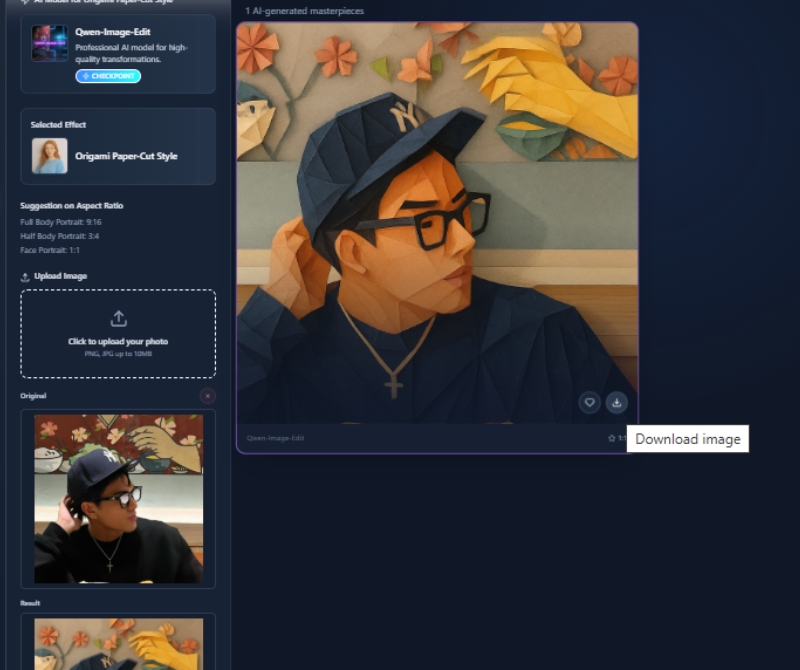
    Once the image is generated, take time to review the final result in detail. Make sure the folds, textures, and overall composition meet your expectations. When satisfied, download the high-quality origami-style image. Your artwork is now ready for sharing, design projects, or creative use.
access the ai origami filter
add your image
apply the origami Filter
preview and download

Discover More Helpful Photo AI Tools

These AI online tools complement the AI Origami Filter by supporting different stages of the creative process. They help users prepare images, enhance visual styles, and turn static designs into dynamic content. Using these tools together makes creative work faster, easier, and more flexible.
"The AI Origami Filter helped me turn simple photos into creative paper-style artwork. The fold details look clean and well-balanced, and the images still feel natural. It’s a great tool for experimenting with artistic styles.”
Hannah Brooks, Visual Artist
11-12-2025
iiiii
iiiii

"I used this filter for social media visuals and was impressed by how polished the results looked. The origami effect adds structure without hiding important details. It’s quick, easy, and effective."
Daniel Ortiz, Digital Marketer
10-26-2025
iiiii
iiiii

"This tool instantly made my project visuals stand out. The folded paper style looks unique and professional, even with minimal effort. I like how easy it is to try different variations.
Sophia Lin, Design Student
10-05-2025
iiiii
iiiii

"The AI Origami Filter fits perfectly into my creative workflow. It transforms images in seconds and produces consistent results. I’d definitely recommend it for anyone exploring digital art."
Ethan Walker, Content Creator
11-18-2025
iiiii
iiiii

"I was amazed at how realistic the paper folds look on my portraits. The tool preserves facial features and object details while adding a creative touch. I could experiment with different images and styles without any hassle. It’s now a regular part of my photo-editing toolkit."
Liam Chen, Photographer
12-20-2025
iiiii
iiiii

"Using this filter saved me hours of manual editing. The AI generates clean origami effects automatically and allows me to experiment with different variations easily. The results are professional-looking and visually appealing. It’s reliable, fast, and perfect for enhancing creative projects."
Ava Thompson, Graphic Designer
11-01-2025

iiiii
iiiii

Why Choose Us

Frequently Asked Questions

What is the AI Origami Filter?

The AI Origami Filter is an online tool that transforms ordinary photos into artistic, folded paper-style images. It uses advanced AI algorithms to detect shapes, edges, and depth in your photo, then automatically applies realistic paper-folding effects. This ensures your main subject remains clear while giving the image a creative origami appearance. The tool is ideal for social media, creative projects, and design experiments. It works without any manual editing or complex software. Overall, it provides a simple way to turn standard photos into unique, handcrafted-style visuals.

How long does it take to generate a folded paper image?

The AI Origami Filter is optimized for fast processing, and most images are transformed within a few seconds. The exact time may vary depending on the file size, resolution, and image complexity. Larger or high-resolution photos might take slightly longer to process, but the tool is designed to maintain efficiency. Users can preview results instantly and regenerate if needed. Despite the speed, the quality of folds, textures, and details is consistently high. This ensures quick and reliable creation of artistic origami-style images every time.
Do I need design skills to use it?

No design experience is necessary to use the AI Origami Filter. The tool automatically analyzes the uploaded photo and generates the folded paper effect in seconds. Users do not need to adjust complex settings, draw shapes, or manually manipulate layers. Even beginners can create visually striking results with minimal effort. This makes it accessible for students, hobbyists, social media creators, and professional designers alike. The user-friendly interface ensures that anyone can experiment and produce high-quality artwork.

Can I adjust the fold patterns or style?

Yes, the AI Origami Filter allows users to regenerate images to explore different fold patterns and artistic variations. Each generation may create subtle changes in the direction, depth, or style of the folds. This gives users the flexibility to experiment with multiple looks and choose the version that best suits their project or aesthetic preference. You can also combine it with other AI tools, like color adjusters or photo enhancers, for further customization. The process encourages creativity without requiring technical knowledge.

Is my photo safe when I upload it?

Absolutely. All images uploaded to the AI Origami Filter are processed securely and are not stored permanently. The platform ensures your personal photos remain private and are never shared with third parties. The AI only uses the image to generate the origami-style effect, then automatically clears temporary data. This gives users peace of mind while working with personal or sensitive images. Security and privacy are top priorities alongside delivering high-quality results.

pro image logoAceThinker PicWish

Perfect Your Images in Second with AI

pro banner image
Back to Top
Contact Us
Learning Center