




menu

Thank you for your purchase

Your order has been confirmed. We have already sent the product registration information including the keycode to your billing email address. If you have not received it yet, please look into the spam of your mailbox. For any questions or concerns, please find the guide at support center or contact us via contact form.

User Guide for Registration

Tips: If you have any questions about the order, please get in touch with our support team via the above link. We will provide a punctual solution in 12 hours. The response to requests sent via other platforms will have a delay of 3 days.
  • Screen Grabber Pro
  • Music Recorder
  • AcePDF (Converter and Editor)
  • PDF Converter Pro
  • Wind Cut

Any Questions? We Have Answers!

1. I cannot activate Screen Grabber Pro, what to do?

The activation of Screen Grabber Pro is a little different from other programs. You will first need to sign up an account by clicking the person icon at the top right corner. Enter the email, verification code and password following the hints on the Sign-up window and finally click "Sign up" to register your account. It’s recommended that you use the same email as that you use to purchase the product to register an account. Generally, we will activate your VIP account as long as you have logged in with the purchase email.
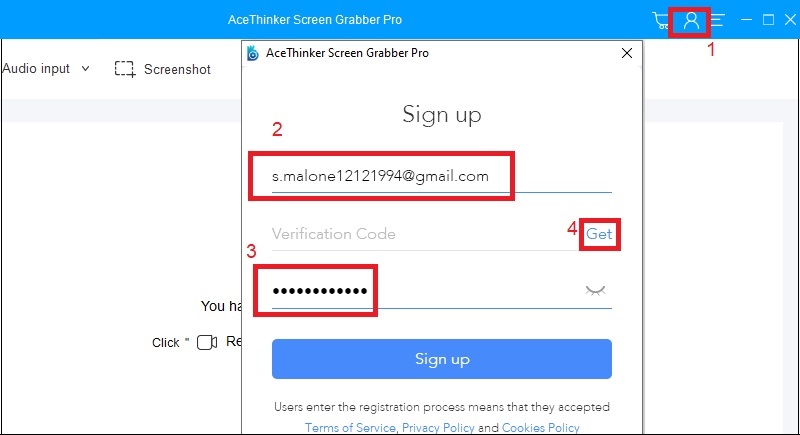
sgp registration window step2

2. How to change the password of my account?

You can go to the account center by clicking the person-image icon from the main interface and then click "Change Password" and you will be directed to the page where you can manage your account information. Choose "Change password" and click "Get" to get a verification code for the password changing (the verification code will be sent to your account email address). Enter the verification code, your new password and then click Save. After that, you can log into our product with the new password.

3. The email I used to buy is not the one I used to register. What should I do?

Generally, your VIP account will be activated automatically after successful payment. You can directly log in with the email you used to purchase the software to enjoy full version of the program. However, if you still want to use the email you have registered as the VIP account, you can contact our support team to help you change the account email. We’re ready to help to solve any kind of problem at any time.

Back to Top
Contact Us
Learning Center