menu

AI Favicon Generator - Design a Perfect Favicon

Our AI favicon generator is built to help websites to quickly create a clean, professional icon without design skills or extra tools. It saves time, reduces design costs, and ensures your website looks polished and recognizable across tabs, bookmarks, and devices.

Make Your Site Recognizable at a Glance

create custom favicons

Create Custom Favicons

A strong favicon helps your website feel more polished and trustworthy, and this AI favicon generator online makes that process feel effortless. Instead of settling for generic icons, you can shape a favicon that actually reflects your brand's mood and style. For example, if you want something playful, minimal, or bold, the tool adapts to that idea without needing design skills. As a result, your site gets a visual identity that feels intentional, not rushed. More than that, it saves you from hiring a designer or spending hours mastering complex graphic design software yourself.

Make Favicons with Simple Text Prompts

Sometimes you already know what you want, but creating it visually is the hard part. With our favicon generator from text, you simply describe your idea in a few words, and the tool does the creative work for you. It allows you to type a short prompt about your brand or website theme, and the icon quickly takes shape. Moreover, it allows you modify your prompts multiple times until you get what you really imagine. This approach feels more natural, especially if you're not comfortable with design tools.

make favicons with simple text prompts
Write the ALT Attribute here, don't make a sentence

Generate Favicon in Multiple Sizes

Favicons appear in many places, from browser tabs to bookmarks and mobile screens, and size matters more than people realize. This AI favicon maker generates favicon art in multiple sizes and supports aspect ratios of 3:2, 4:3, and 1:1, ensuring optimal display across diverse platforms without pixelation or distortion. As a result, your favicon stays sharp whether it's tiny in a tab or larger on a shortcut. This saves time and avoids the frustration of icons looking blurry or cropped. Additionally, you can also include your preferred size in the description to ensure the output precisely matches your technical specifications.

Craft High-Quality Favicon

A favicon may be small, but poor quality is easy to notice. Our AI favicon generator delivers clean, high-quality results that look professional at any size. Because it's powered by smart image generation, the details stay clear, rather than turning muddy or pixelated. Moreover, you don’t need to tweak or retouch the generated favicon before using it. This also makes the process more efficient, allowing users to focus on your creative vision. With the AI favicon generator online, you get a polished icon that’s ready to use the moment it’s created.

craft high-quality favicon

Quick Steps to Create a Favicon Online

  • 01
    Open Favicon Generator
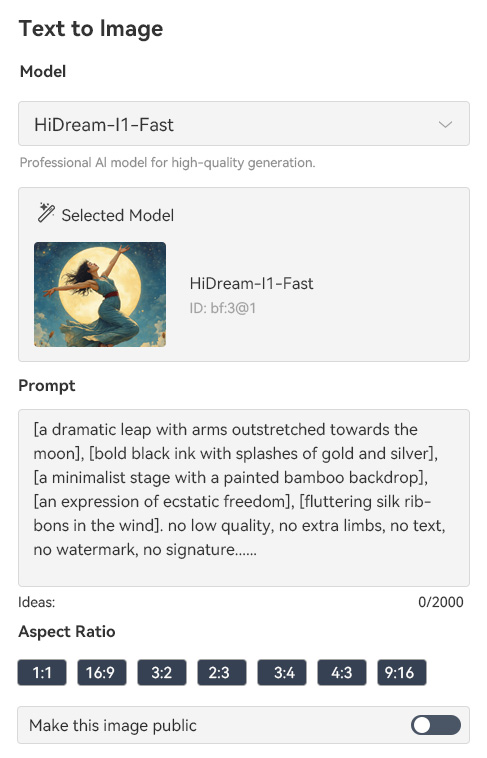
    Navigate to the AI favicon generator interface through your web browser. Then, make an account or log in to access the full suite of generation and customization options. When you have successfully logged in, click the "Text to Image" option on the left panel of the tool.
  • 02
    Enter Text Prompt
    After selecting the "Text to Image" option, choose the AI model you want to use. You can pick from the specialized generative models and select the one you want. Next, enter your desired favicon characteristics in the provided prompt field.
  • 03
    Generate Favicon
    Once you enter your textual prompt, choose the aspect ratio you prefer. Next, click on the "Create" button to start the generation process. The tool will then produce your favicon based on your input.
  • 04
    Save Favicon Art
    Review the generated favicon, and if you want to modify it, you can tweak your text prompt. If you are satisfied with the generated favicon, click the download icon. Then, the tool will save your image to your local drive.
open favicon generator
choose image
generate favicon
save favicon art

Try Other Useful Tools

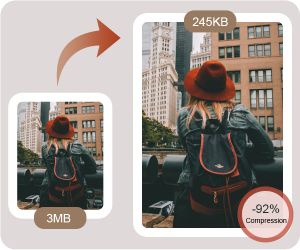
From fun motion effects to smart image optimization, these recommended tools cover both creativity and performance needs. They are ideal if you want eye-catching visuals that also load fast and stay well-organized. Overall, they help you create, refine, and share content with less effort and better results.
"I used this AI favicon generator online for a client site, and it saved me a lot of time. I just typed a short idea and got usable icons right away. It’s a nice option when you need something quick."
Lily-Marie Bray, Freelance Web Designer
2025-12-05
iiiii
iiiii

"I’m not good at design, so this tool was a lifesaver. I liked how I could describe what I wanted and get a favicon without stress. It made my website look more complete. Thanks!"
Angel Owen, Small Business Owner
2025-12-01
iiiii
iiiii

"I needed a favicon fast before launching our site, and this worked well. The AI gave me several options, so I could choose the one that best fit our brand. It saved me from hiring a designer for a small task."
Kevin Sawyer, Startup Founder
2025-11-30
iiiii
iiiii

"We often need small assets for campaigns, and this tool helped with favicons. The output looks professional enough for work use. I will definitely use it again when needed."
Yasmine Barber, Marketing Assistant
2025-11-07
iiiii
iiiii

"I wanted my course site to look more professional, and a favicon helped. This AI favicon generator online made the process easy. I liked how straightforward everything was. "
Keiran Krueger, Online Course Creator
2025-11-04
iiiii
iiiii

" I wanted a favicon that matched my blog theme, and this tool helped me get one easily. Typing a short prompt was enough to start. The process felt smooth and not confusing. It’s good for beginners like me."
Eddie Phillips, Blogger
2025-10-01

iiiii
iiiii

Why Choose Us

Frequently Asked Questions

What is a favicon?

A favicon is a small icon that illustrates a website in browser tabs, bookmarks, and history lists. It helps users quickly identify your site among multiple open tabs. Favicons also appear in shortcuts on mobile devices, making your website easier to recognize. Essentially, it’s a tiny visual brand for your website. You can create it using a logo, initials, or a simple graphic. When users see it consistently, it improves their experience and memory of your site. Even though it’s small, it plays an important role in your website’s identity.

What are the benefits of using favicons?

make your website more recognizable and professional to users. They help people find your site quickly when multiple tabs are open. Using a favicon also improves user trust because it shows attention to detail. It can strengthen your brand identity when the icon matches your logo or theme. Additionally, favicons appear in bookmarks, history, and browser shortcuts, which can increase repeat visits. They also make your website stand out in search results.

What is the recommended size of a favicon?

The recommended size for a standard favicon is usually 16x16 pixels for browser tabs. However, you can create larger sizes, such as 32x32, 48x48, or even 64x64, for better clarity on high-resolution screens. Some platforms or devices may require multiple sizes to display correctly. It’s also common to include a 180x180 version for Apple touch icons. Creating multiple sizes ensures your favicon looks sharp on all devices and contexts. Most online favicon tools automatically generate these sizes for you.

How long does it take to create a favicon?

Creating a favicon can take just a few seconds using an online AI favicon generator. You can type a short prompt or upload a logo to quickly get several icon options. Once the icon is ready, downloading it is usually instant. You don’t need to spend time learning complex design software. This makes it very convenient for small websites or projects with tight schedules..

Can I design a favicon without experience?

Yes, you can design a favicon without any design experience. AI-powered tools simplify the process by generating icons from text prompts or uploaded images. You don’t need to know about colors, sizes, or graphic software. The tool handles all the technical details for you. You can still tweak the results slightly to better match your brand. This means even beginners can easily create professional-looking favicons. As a result, anyone can improve their website’s look without learning design skills.

pro image logoAceThinker PicWish

Cleanly Cut Out Backgrounds

pro banner image
Back to Top
Contact Us
Learning Center