menu

AI Rose Giving Video Generator

The AI Rose Giving Video Generator lets users quickly and easily create romantic videos with rose-giving animations. It’s perfect for anyone who wants to provide heartfelt messages or special clips.

You May Also Like

Bring Smiles with Personalized Rose-giving Animations

instant rose video creation

Instant Rose Video Creation

With this feature, you can quickly turn any photo into a romantic video. You just upload your image, select the effect you like, and apply it to see instant results. It’s very easy to use, even if you have no editing experience. This saves you a lot of time compared to traditional video creation. Furthermore, users can make multiple videos in minutes. Overall, this AI Rose Giving Generator makes the process fast and enjoyable.

Lifelike AI Rose-Giving Effect

With the Send Rose AI filter, your videos instantly look more lively and romantic. This feature adds realistic rose-giving animations to your videos. Additionally, the AI ensures the roses look natural, moving smoothly with the photo. It makes your clips feel heartfelt and professional. You also don’t need to animate anything, which is a huge time-saver manually. The effect works well for any photo you choose.

lifelike rose giving effects
perfect for any occasions

Perfect for Any Occasion

You can use this tool for birthdays, anniversaries, or simple love notes. It offers versatility, so every video fits the mood of your message. You can easily create something thoughtful without complicated software. This makes it ideal for both personal and social media use. It also lets you express emotions visually in a fun way. Overall, this Free Giving Rose AI effect helps you make meaningful videos anytime.

Template-Based Video Styles

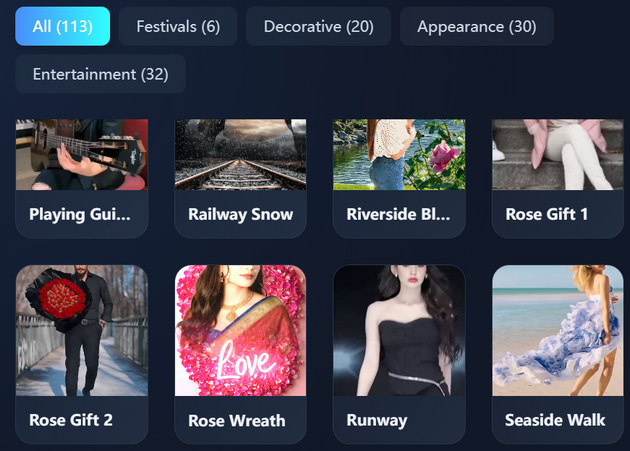
With the AI Rose Giving effect, your videos instantly look lively, romantic, and visually appealing. This feature lets you choose from pre-made templates to quickly create beautiful rose-giving videos. Each template applies professional-looking effects automatically, so you don’t need to edit manually. It makes it easy to produce consistent and polished videos every time. Users can pick styles that match the mood or occasion, saving a lot of effort.

template based video styles

Easy Steps to Make Rose Giving Videos

  • 01
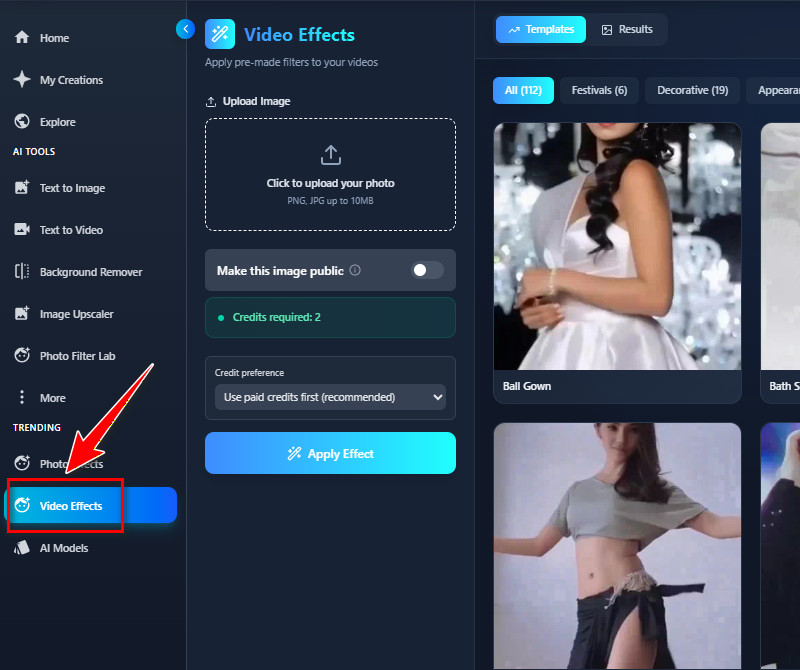
    Create an Account or Login
    First, visit our AI Rose Giving Generator using any web browser. Then, the tool will ask you to register if you don't have an account yet. If you have one, log in to your account and proceed to the Video Effects tab.
  • 02
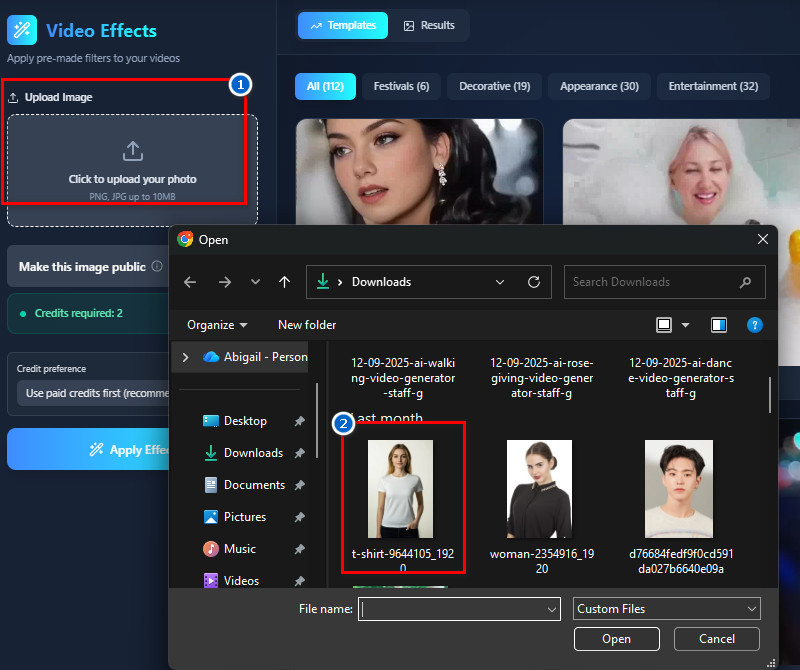
    Add Your Photo
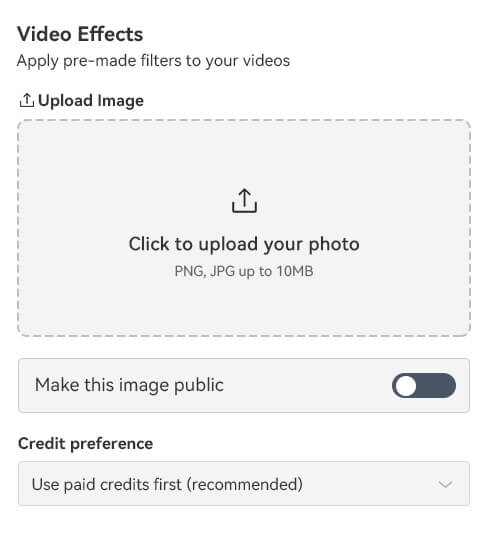
    Next, go to the upload section and click the button. File Explorer will open, and from there you can find your photo. Or, you can drag your image to the upload section for easy upload.
  • 03
    Apply the Rose Giving Effect
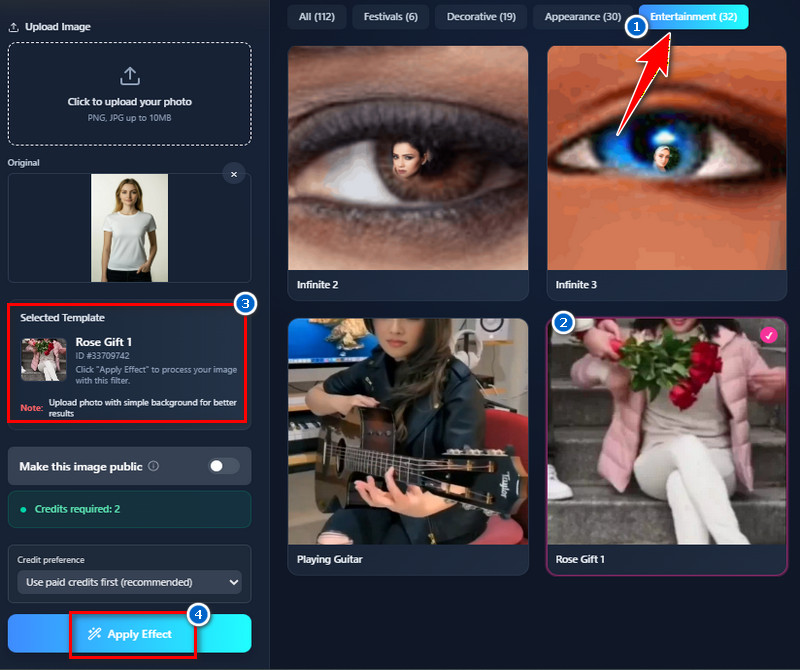
    Once the photo is uploaded, start finding the rose-giving effect on the right side. When you've already chosen, click it to select. Then, hit the "Apply Effect" button, and the tool will generate your photo and apply the effect.
  • 04
    Download and Share
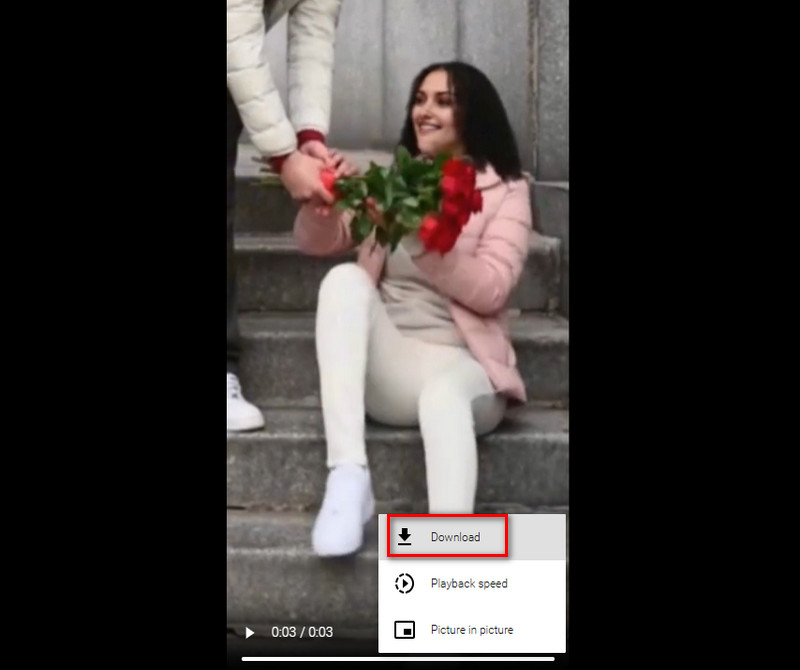
    When the process is done, see the results on the "Results" tab. But to preview the generated video, click the "Download" icon. Finally, click the tree-dot icon, select the "Download" button to save the video.
create an account or login
add your photo
apply the rose giving effect
download and share

More Apps to Simplify Your Work

From upgrading old photos to adding dynamic motion and depth, these apps are built for users who want their visuals to stand out effortlessly. Whether you're editing for fun, social media, or creative projects, these tools help turn ordinary media into eye-catching content.
"I wanted to create a love-themed video for social media, and this app made it simple. The templates are nice, and the output looks polished. It doesn’t take long to generate a video."
Kevin Santos, Web Designer
10-15-2025
iiiii
iiiii

"I created a rose-giving video for a friend’s birthday, and it was very simple. The animation looks realistic and fun. It’s a great tool for personal use."
Clara Mendoza, Student
10-29-2025
iiiii
iiiii

"I’ve tried a few online generators, and this one is easy and reliable. The AI adds smooth rose-giving animations to photos in seconds. It saves a lot of time for quick video posts."
Javier Rivera, Content Creator
12-01-2025
iiiii
iiiii

"I made a rose-giving video for my partner, and it was very easy. The animation looks smooth and realistic. It’s perfect for sharing small, heartfelt moments."
Lucas Perez, Photographer
11-13- 2025
iiiii
iiiii

"I used it to make a fun, romantic social media clip. The rose-giving effect looks very realistic. It’s easy and enjoyable to use for casual videos."
Daniel Reyes, Music Producer
12-06-2025
iiiii
iiiii

"I made a small gift video for a loved one, and it worked perfectly. The animations are lifelike and smooth. It’s a really simple app for personal use."
Maria Torres, Marketing Specialist
11-17-2025

iiiii
iiiii

Why Choose Us

People Also Asked

What kind of photo works best for rose animations?

The tool supports any image in JPG or PNG format. Photos with a clear face produce the best results. While the AI can animate different poses, simpler backgrounds make the effect smoother. On the other hand, busy or cluttered backgrounds may degrade animation quality. Good lighting also helps the rose-giving effect look more realistic. Overall, clear and simple photos provide the most natural results.

Can I use this AI tool on my phone?

Yes, the tool is web-based and can be used on both Android and iPhone devices. The interface is easy to navigate on smaller screens. You can upload photos and create videos without installing any additional apps. The tool works efficiently on mobile browsers. Therefore, users can create videos on the go without issues. It offers a convenient solution for mobile content creation.

Will my original photo be saved or shared?

No, all uploaded photos are kept private and are not shared. The tool only uses images to generate the animation. No copies of the original photo are stored for other purposes. This ensures that personal and sensitive photos remain secure. Users can confidently upload images without worrying about privacy. Moreover, security and confidentiality are maintained throughout the process.

How many photos can I upload at once?

Only one photo can be uploaded at a time. This approach allows the tool to focus on generating one animation per upload. This means that multiple uploads cannot be performed simultaneously. It keeps the process straightforward and avoids errors. Videos can be created efficiently one at a time. This method ensures each animation is accurate and smooth.


Can I try the rose-giving generator for free?
Yes, new users receive 10 free credits to test the tool. These credits give you the freedom to try the tool without paying a cent. Users can evaluate the quality and effects before purchasing additional credits. The free trial offers a clear insight into the tool's capabilities. After the free credits are used, more can be purchased as needed. It is an easy way to try the service risk-free.

Back to Top
Contact Us
Learning Center