menu

AI Teeth Whitening Photo Editor - Enhance Your Smile Instantly

This advanced tool leverages artificial intelligence to meticulously detect and whiten your teeth. It is perfect for those seeking to digitally enhance their smile for social media, professional profiles, or personal satisfaction.

Get a brighter, whiter smile in seconds with our AI-powered photo editor

see the glow

Enhance Your Smile Naturally

Sometimes a great photo is almost perfect, except for a dull smile. This feature of the teeth whitening photo editor gently improves brightness while keeping everything looking real, so your photo never feels overdone. It gently balances brightness to match your natural skin tone and lighting. This means selfies, portraits, and even professional headshots still look like you, just more confident. Moreover, the image quality stays intact, so there’s no blur or color damage.

Whiten Teeth in Seconds

We’ve all had moments when a great picture is ruined by stains or yellowing. With this feature, the process feels effortless; you upload, describe what you want, and let the tool handle the rest. You simply upload your photo, describe the change you want, and let the tool handle the rest naturally. There’s no need for manual brushes or editing skills, which saves time and frustration. As a result, stains and discoloration fade away while your smile stays authentic. It’s an easy tool for anyone who wants quick improvements without complicated steps.

whiten teeth in seconds
flexible ai style control

Flexible AI Style Control

Not all photos are the same, and that’s where flexibility really matters. This teeth whitener AI photo editor lets you choose from multiple AI models, so the results match your photo style and quality needs. Whether you want quick edits or more refined adjustments, the models adapt to different lighting and angles. Additionally, aspect ratio options help your image fit perfectly for social media, resumes, or profiles. This means less cropping and fewer do-overs. Overall, you stay in control while the AI does the heavy lifting.

Edit Anywhere, Anytime

Editing your images shouldn’t tie you to a desk, and this feature understands that perfectly. Our teeth whitener editor works smoothly on phones, tablets, and computers without requiring downloads or technical know-how. Whether you’re using iOS or Android, you can brighten your smile right after snapping a photo. Besides, the simple web-based design keeps everything fast and accessible, even on the go. Because of this, editing feels effortless rather than intimidating.

edit anywhere, anytime

4 Steps to Easily Brighten a Smile

  • 01
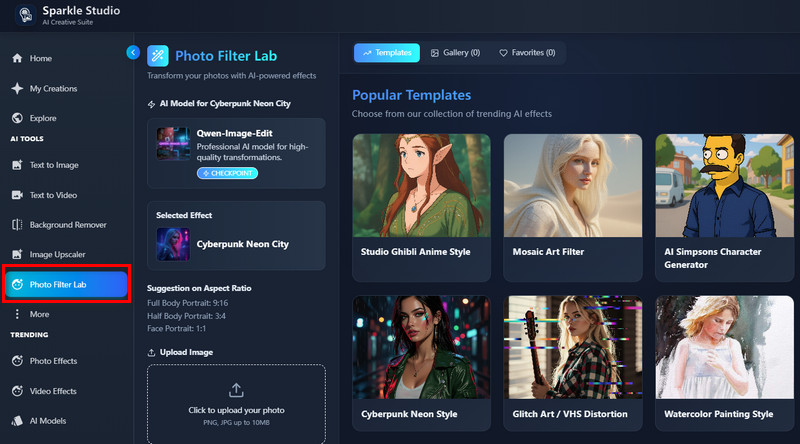
    Access AI Teeth Whitener
    Navigate to the online platform where the AI-powered teeth whitening tool is hosted. Then, access your account or make a new account for new users. Once logged in, you will see the tool's main interface.
  • 02
    Add Transformation Prompt

    On the tool's main interface, locate the "AI Photo Filter." After that, select the "AI Model" you want to use for the smart generation. Then, add a simple prompt describing what you want to edit in your image.
  • 03
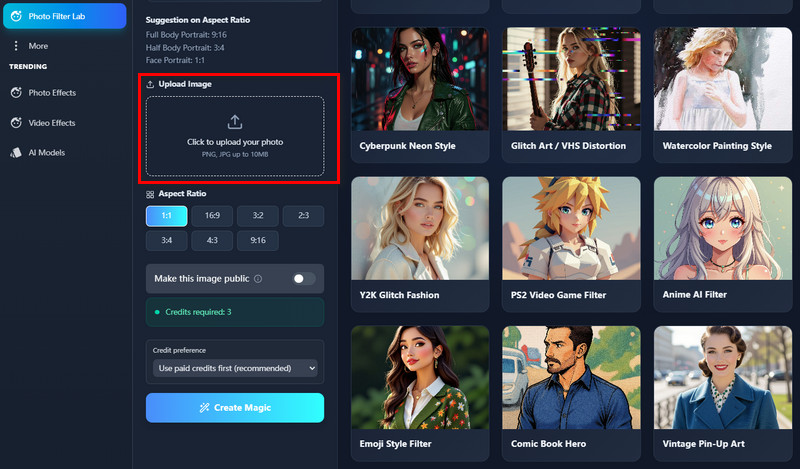
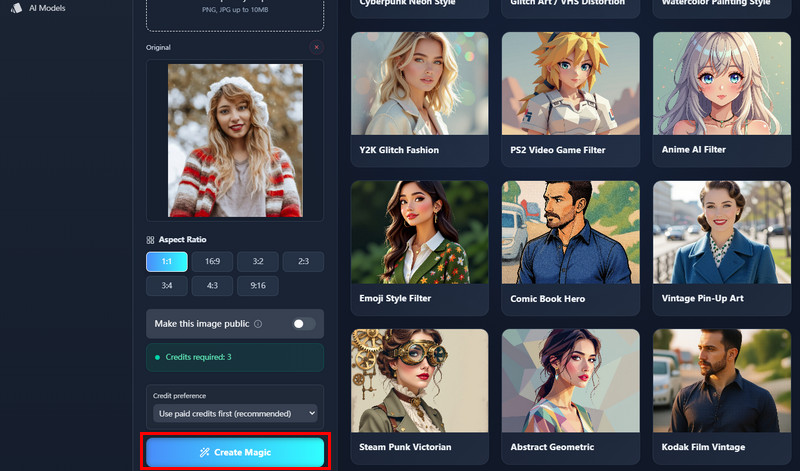
    Whiten Teeth
    Next, upload your photo from your device to the platform. Then, choose the dimension or aspect ratio of your image. Finally, click the "Apply Effect" button to start editing the image.


  • 04
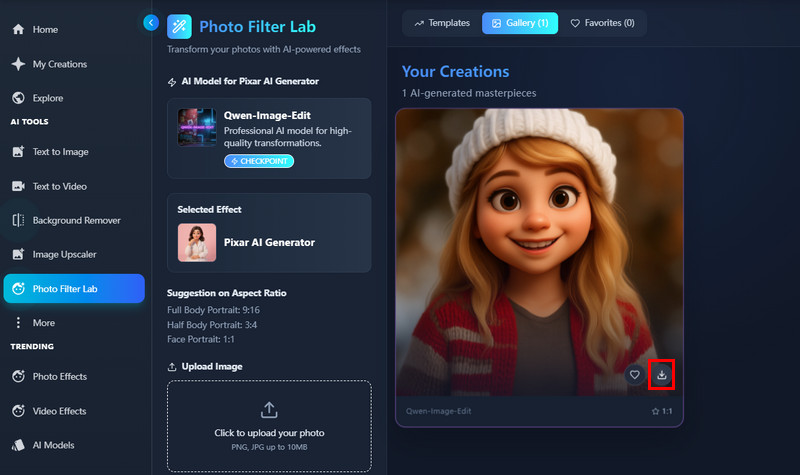
    Download the Edited image
    Wait a few seconds for the AI to process your request and apply the teeth-whitening effect. Once your image is complete, you will see it in the preview window, where you can review it. Afterward, click the "Download" option to save it on your device.
access ai teeth whitener
add transformation prompt
whiten teeth
download the edited image

Explore More AI Tools, Create Without Limits

Designed for users who want quick visual improvements and creative transformations, these tools focus on simplicity and results. Instead of complex editing workflows, they offer fast, AI-powered solutions for everyday image needs. Whether for fun or practical use, each app helps users achieve better visuals with minimal effort.
"I used this AI teeth whitening photo editor online for a few selfies, and the results looked very natural. My teeth were brighter, but not overly white or fake. It was quick to use, and I didn’t need any editing skills. I’ll probably use it again for profile photos.
Bethany Meza, Marketing Assistant
2026-01-03
iiiii
iiiii

"I needed a clean headshot for work, and this tool helped a lot. The whitening looked realistic and didn’t affect the rest of my face. I liked that I could finish everything in minutes. It saved me from booking a photo retouching service."
Emilia Marquez, Real Estate Agent
2026-01-02
iiiii
iiiii

"I tried it on a group photo, and it worked better than I expected. The teeth looked evenly whitened without changing skin tones. The process was simple and easy to understand. It’s nice not having to download any apps."
Anika House, University Student
2025-12-30
iiiii
iiiii

"I tested this editor on a few client photos for minor touch-ups. The AI whitening was subtle, which I really appreciate. It didn’t lower image quality or add strange colors. It’s a useful tool for quick edits."
Brooklyn Everett, Freelance Photographer
2025-12-19
iiiii
iiiii

"I use this tool when posting photos on social media. It fixes yellow tones without making the smile look unnatural. The results blend well with natural lighting. Overall, it feels practical and reliable."
Seamus Fisher, Content Creator
2025-12-16
iiiii
iiiii

"This tool helped improve my gym photos without changing the overall look. The teeth whitening was balanced and natural. It didn’t affect image sharpness. I’d recommend it for small touch-ups."
Austin Odonnell, Fitness Coach
2025-11-03
iiiii
iiiii

Why Choose Us

Frequently Asked Questions

How can you retouch your teeth in an image?

You can retouch your teeth by uploading your photo to an AI-powered photo editor that focuses on teeth whitening. The system automatically detects your teeth without needing you to select or brush over them. You simply describe the result you want, and the tool handles the adjustment. This removes the need for manual editing skills or complicated tools. The whitening is applied evenly, so the smile still looks natural. In addition, the rest of the image stays untouched. Overall, the process feels simple and practical for everyday users.

Will your image lose quality after editing?

No, your image does not lose quality after editing. The AI works only on the teeth area instead of compressing the entire photo. This means sharpness, lighting, and resolution stay the same. You can still zoom in without seeing blur or distortion. Moreover, colors outside the smile remain unchanged. This makes the final photo suitable for both personal and professional use. In short, the quality you upload is the quality you download.

Is the process fast and secure?

Yes, the process is fast and secure for regular use. Uploading the image and applying the edit usually takes only a few moments. You do not need to install software or create complicated accounts. Your image is processed automatically and not shared publicly. In addition, there is no manual handling of your files. This reduces unnecessary risk and waiting time. As a result, you can edit confidently and move on quickly.

Does the downloaded image contain a watermark?

No, the downloaded image does not include a watermark. Your edited photo looks clean and professional. This makes it suitable for resumes, social media, or business profiles. You do not need to crop or edit anything further. The image remains exactly how you want it. Additionally, there is no branding covering your smile. This gives you full freedom to use the image anywhere.

Can you use it on multiple platforms?

Yes, you can use it on multiple platforms without any issues. The photo editor works on desktops, tablets, and smartphones. Whether you are using Android, iOS, or a web browser, the experience stays smooth. You do not need special software or advanced hardware. This makes it easy to edit photos while at home or on the go. Moreover, the interface adapts well to different screen sizes. Overall, you can retouch your teeth anytime and anywhere.

pro image logoAceThinker PicWish

Remove Backgrounds from Images with Precision

pro banner image
Back to Top
Contact Us
Learning Center