menu

AI Sprite Sheet Generator - Make Animated Characters and Game Assets with AI

Our online AI sprite generator lets you quickly make high-quality sprite sheets for games, animations, and digital projects. It works well for game developers, designers, and beginners, and can create many different sprite styles fast.

Create Your Custom Character Animations with Ease

turn ideas into sprite art

Turn Ideas Into Sprite Arts

Our AI Sprite Generator shines when you want to see your ideas come to life. You simply describe what's in your head, and the tool turns those words into clear, usable pixel sprites. It also enables you to edit your idea by retyping or adding details to your prompt. Instead of spending hours sketching or fixing proportions, you can focus on refining your concept and experimenting with styles. As a result, you feel confident right away in creating animated characters.

Fast Creation of High-Quality Characters

When speed matters but quality can’t slip, this feature makes a noticeable difference. This sprite sheet creator lets you generate polished character sprites in minutes instead of spending hours refining tiny details. You simply describe what you need, and the results come back clean, consistent, and ready to use. This helps you work faster without losing visual quality. It’s a great image generator for quickly testing several ideas. You’ll spend less time fixing art and more time actually building your game.

Write the ALT Attribute here, don't make a sentence
create eye-catching sprite game assets

Create Eye-catching Sprite Game Assets

Characters alone aren’t enough, and that’s why asset creation matters so much when building a game. Using this AI sprite sheet maker, you can quickly generate items, creatures, and environment pieces that match your overall style. Instead of hunting for mismatched assets online, everything feels designed for your project. Moreover, it allows you to customize the look of your assets by editing the prompt text. This consistency helps games look more polished and immersive.

Build Immersive Sprite Scenes and Backgrounds

Aside from characters and assets, the scenes and backgrounds set the mood. This 2D sprite sheet maker helps you shape that atmosphere with ease. You can create forests, towns, or fantasy spaces that instantly support your story or gameplay. The tool provides a strong visual foundation to build on, saving you time while still allowing you to retain creative control over the final look. As a result, your game world feels connected and intentional.

build immersive sprite scene and backgrounds

Four Quick Steps to Generate a Sprite Character

  • 01
    Visit the Sprite Generator
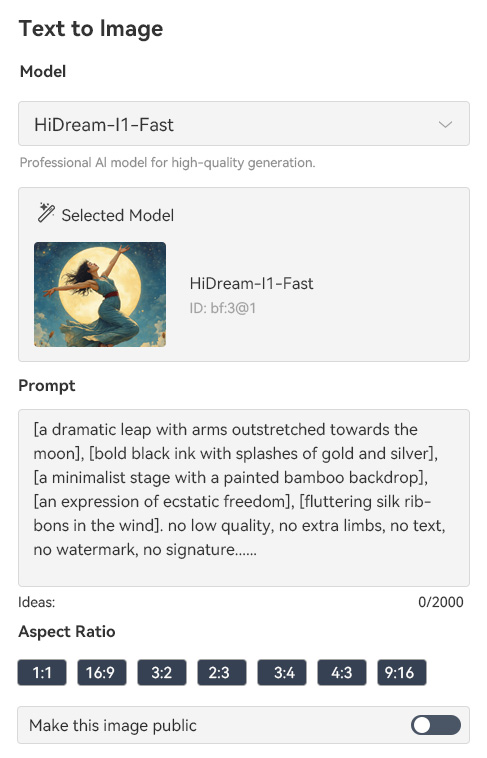
    First, head over to the sprite generator website using your browser. Next, create a new account or sign in if you already have one. This only takes a moment. Then, once you’re logged in, access the "Text-to-Image" feature and get ready to start creating your sprites.
  • 02
    Add Text Prompt
    Before typing anything, first choose the AI model you want to use for image generation. Then, enter a clear text prompt that describes the sprite you want to create. Review your prompt and make small changes as needed to improve your results.
  • 03
    Create Sprite Sheet
    Once you add your text prompt, make sure to select the aspect ratio before creating your sprite character or assets. Then, double-check your settings to make sure everything looks right. And then click the "Create" option and let the tool generate your sprite.
  • 04
    Download Sprite Art
    Once your sprite is ready, take a moment to preview the result. Smash the "Download" option to save the sprite art to your device. After that, you can easily use it in your game, animation, or creative project.
visit the sprite generator
add text prompt
create sprite sheet
download sprite art

Discover Additional Tools for Your Image Enhancements

Create, edit, and share visual content quickly and effortlessly with these powerful solutions. Users can compress images, remove backgrounds, generate videos, and add creative effects without any advanced skills. With these, you can enhance your projects effectively.
"I was amazed at how quickly I could create sprite characters just by typing a description. It saved me hours compared to drawing each frame manually. I love how they are ready to use in my game engine."
Darren Khan, Game Developer
2025-12-04
iiiii
iiiii

"This tool is really intuitive. I don’t have much art experience, but I can easily generate unique characters and even tweak their looks. It definitely speeds up my workflow."
Alesha Anderson, Game Designer
2025-11-28
iiiii
iiiii

"I used it for a small school project, and it worked perfectly. The AI interpreted my prompts well, and the sprites looked detailed enough for my game prototype. I didn’t expect such good results so fast."
Arnold Marshall, Student
2025-12-15
iiiii
iiiii

"The interface is simple, and it’s easy to start creating without tutorials. Even minor prompts gave me sprites that matched what I imagined. Definitely useful for quick prototyping. Highly recommended!"
Danielle Buckley, App Developer
2025-11-07
iiiii
iiiii

"I like that I can generate multiple poses for a character in one go. It makes building animations smoother and less frustrating. It’s a real time-saver for me."
Ecain Furgerson, Freelance Animator
2025-11-23
iiiii
iiiii

"What I liked most is how fast the AI works. I was able to produce an entire sprite sheet in minutes, whereas it normally takes me hours. It’s great for testing new ideas quickly."
Mita Beasley, Game Enthusiast
2025-11-01

iiiii
iiiii

Why Choose Us

FAQs about AI Sprite Sheet Generator

What is a sprite?

A sprite is a 2D image or animation that represents a character, object, or effect in a game. You can use sprites for characters, enemies, items, or background objects. They are usually small and designed to move or animate smoothly. Moreover, sprites are essential for creating visually interactive games. You can combine multiple sprites to make animations or actions. They are often stored in a sprite sheet for easier use in games.

What is a sprite sheet generator?

A sprite sheet generator is a tool that helps you create multiple sprites at once. You can generate characters, objects, or effects and organize them in a single sheet. This makes it easier to use them in game engines or animation software. You do not need to draw each frame manually, which saves a lot of time. The generator can automatically turn a text description into visual sprites. It also helps keep your sprite style consistent across different frames or characters.


Do I need a high-end device to use this generator?

No, you do not need a high-end device to use this sprite sheet generator. Our AI Sprite Sheet Generator is online, so most of the processing happens in the cloud; your computer only needs to load the interface. You can run it on a laptop, desktop, or even some tablets. The experience is smooth as long as you have a stable internet connection. Besides, you do not need advanced graphics hardware to create detailed sprites. This makes it easy to generate sprites without worrying about device limitations.

Does this sprite maker store any of my images?

Yes, the generator temporarily stores all your creations on your account. They are automatically deleted after 30 days to protect your privacy. If you want to share your sprite creations, you can make them public. Furthermore, all stored images are encrypted, so nobody else can access them without permission. You can manage your creations and decide which ones to share or keep private. This ensures that your work is safe while still giving you flexibility.

Can I make sprite art characters in 3D?

Yes, you can create 3D sprite characters using this generator. You just need to include “3D” in your text prompt when describing your character. The tool can also apply different art styles, like pixel art, cartoon, or realistic. You can experiment with angles, poses, and designs to get the look you want. This allows you to create characters that stand out in your game. You do not need separate 3D modeling software for simple sprites.

pro image logoAceThinker PicWish

Remove Backgrounds from Images with Precision

pro banner image
Back to Top
Contact Us
Learning Center