menu

Create Social Media Videos for Better Engagement
Create unique and engaging social media videos quickly, perfect for posts, ads, or stories.
Edit Photos for Social Media
Or drop image here, paste image or URL
Try with one of these

Engaging Videos for Social Success

photo_library

Content Creators

Building an audience often requires a steady stream of engaging video content. AI-powered tools transform ideas into social-ready videos with minimal editing work.
temp_preferences_custom

Social Media Managers

Maintaining active brand accounts means producing content on a consistent schedule. Faster video creation helps support campaigns and increase audience engagement.
movie

Small Businesses

Promoting products and services online is easier with compelling video content. Simple video creation tools help improve visibility without advanced editing skills.
sync

Marketing Teams

Launching campaigns across multiple platforms requires efficient content production. AI video generation accelerates workflows while maintaining quality and brand consistency.

Create Social Media Videos by Scenario

Produce engaging, professional videos for different social media use cases.

shopping_bag

YouTube Shorts

Creating short, engaging videos quickly is hard without losing quality or audience attention.

  • check_circle Make eye-catching clips
  • check_circle Highlight key points clearly
  • check_circle Share across social platforms
video_library

Blog Video Content

Turning blog posts into videos can be time-consuming, and the results often feel dull or uninspired.

  • check_circle Turn articles into videos
  • check_circle Add visuals to explain concepts
  • check_circle Keep viewers interested longer
brush

Product Demos

Showcasing products in action is difficult without professional filming equipment or editing skills.

  • check_circle Highlight product features
  • check_circle Showcase usage scenarios
  • check_circle Produce professional demos

Steps to Create Videos for Social Media

Quickly create, generate, and save videos for any project or purpose in just minutes.

  • 1

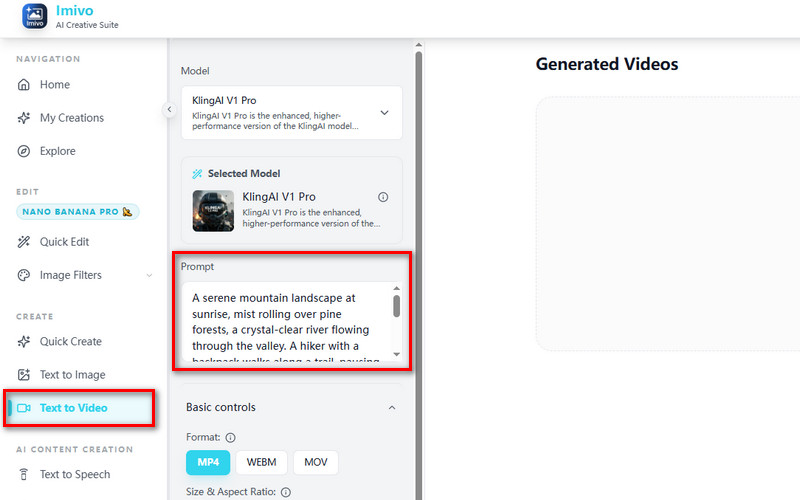
    Enter Your Instruction

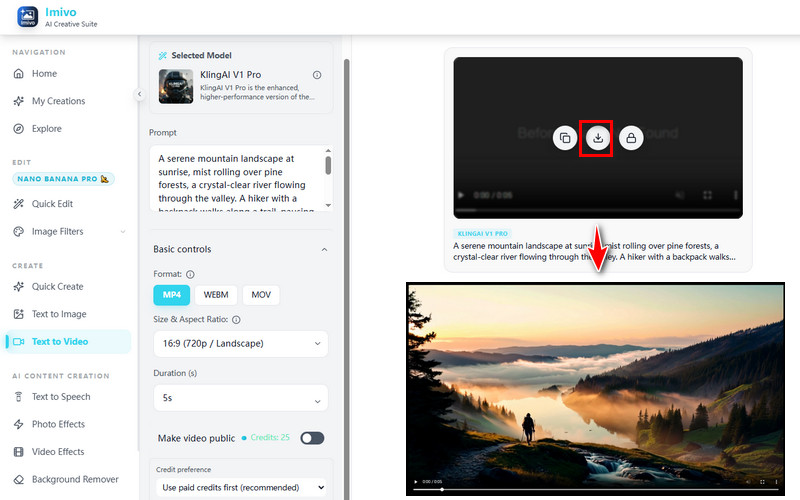
    Go to the social video maker and find the Prompt box. Type what kind of videos you want to make. Be clear so the AI understands you.

  • 2

    Generate Video

    Hit the "Generate Video" button, and the AI will start analyzing your prompt and create the video. The process will take 5-6 minutes, depending on the length of the video.

  • 3

    Save the Video

    Preview the created video and see if it matches your prompt. Finally, save it in your preferred format and upload it to your social media.
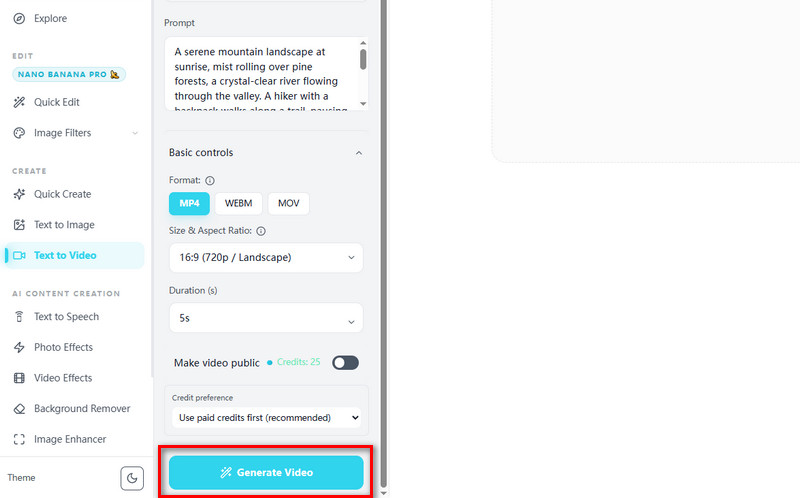
Enter Your Instruction
Generate Video
Save the Video

Why Choose Us

bolt
Supports Various Video Formats

Use different video formats to easily play your videos on any device

verified_user
Choose Video Aspect Ratio

Select the video aspect ratio that works best for your platform or project.

school
Set Durations

Set durations to control how long each video clip plays.

school
Works with AI

Create videos quickly with AI assistance for faster results.

Frequently Asked Questions

How can I generate short-form videos optimized for social media platforms?expand_more

You can create short-form videos for social media using the tool’s Text to Video feature. Users can enter a prompt describing the scene, movement, subject, or visual style, then generate short clips ranging from 4 to 10 seconds. For example, users can create short product showcases, outfit transition videos, motivational scenes, or animated promotional ads for social media campaigns. The workflow supports aspect ratios commonly used for social platforms, making the generated videos suitable for TikTok, Instagram Reels, YouTube Shorts, Facebook Stories, and other vertical or square video formats.

What aspect ratios (e.g., 9:16, 1:1) are supported for different platforms?expand_more

The Text to Video feature supports a wide range of aspect ratios, including 9:16, 16:9, and 1:1. The 9:16 format is suitable for TikTok, Instagram Reels, Facebook Stories, and YouTube Shorts because it fits full-screen vertical viewing on mobile devices. The 1:1 aspect ratio works nicely for Instagram feed posts, Facebook feed videos, and square promotional content. The 16:9 format is more suitable for YouTube videos, presentations, and website video banners.

Can I quickly create multiple variations for A/B testing?expand_more

The tool currently generates one video at a time, but users can reuse the same prompt with small adjustments to create multiple short-form video variations. Users can also switch between supported AI models, such as Vidu 1.5 for stylized, expressive scenes, KlingAI V1 Pro for sharper, more realistic visuals, and Veo 3.0 Fast for faster video generation and rapid concept testing. This workflow can help create multiple versions of promotional videos, product clips, or social media ads for A/B testing and campaign optimization.

Does the tool support adding subtitles or captions automatically?expand_more

Users can include subtitle or caption instructions directly inside the text prompt to generate videos with visible text elements. Prompt-based captions can help create short-form videos for social media platforms, where on-screen text is commonly used to enhance engagement and accessibility. However, for more accurate subtitle timing, placement, or styling, exporting the generated clip to a dedicated video editor may provide more precise caption editing controls.

Can I control the style, tone, and pacing of the generated videos?expand_more

Yes, users can influence the visual style, scene pacing, camera movement, tone, and subject behavior by writing detailed prompts. Descriptions related to lighting, motion, transitions, color themes, and animation style can affect how the final video is generated. However, the current Text to Video workflow primarily supports short clips of 4-10 seconds, which may require generating multiple scenes for longer content.

What export settings are recommended for platforms like TikTok or Instagram?expand_more

The tool supports exporting videos in MP4, WEBM, and MOV formats. MP4 is commonly recommended for TikTok, Instagram Reels, Facebook, and YouTube Shorts because it offers broad compatibility and efficient file compression. For vertical short-form content, the 9:16 aspect ratio with resolutions up to 1080p is suitable for mobile viewing platforms. The 1:1 format is more appropriate for Instagram feed posts and square promotional videos.

Start Creating Amazing Videos

Create unique, professional-quality videos instantly using AI that brings your ideas to life faster than traditional editors.

No credit card required
Back to Top
Contact Us
Learning Center